|
|
This article describes the design of a simple editor for the Velocity [1] templates in our web application. Our web application has a model 2 architecture [2] in its user interface. A front controller [3] with commands operates on a domain layer [4] and chooses a Velocity template as the view for rendering the response. The view becomes an SMS text message.
The front controller is customised and localised for each of several deployments of the web application. We need an editor that will ease such customisation. Customisers know the page flow of the web application. The editor needs to present the mapping between commands and the Velocity templates that commands forward to. It should allow users to preview their work so that they know that it has a legal Velocity syntax, and what it will look like when rendered by the web application.
A Java applet allows the editor to have a rich user interface. We will bundle the Velocity library with the editor and use mock objects for the variables in Velocity templates. The editor can then compile the edited template and present the result for preview.
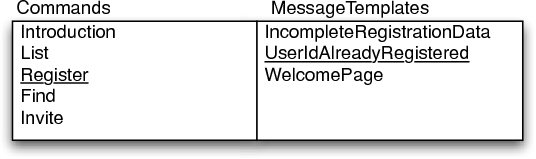
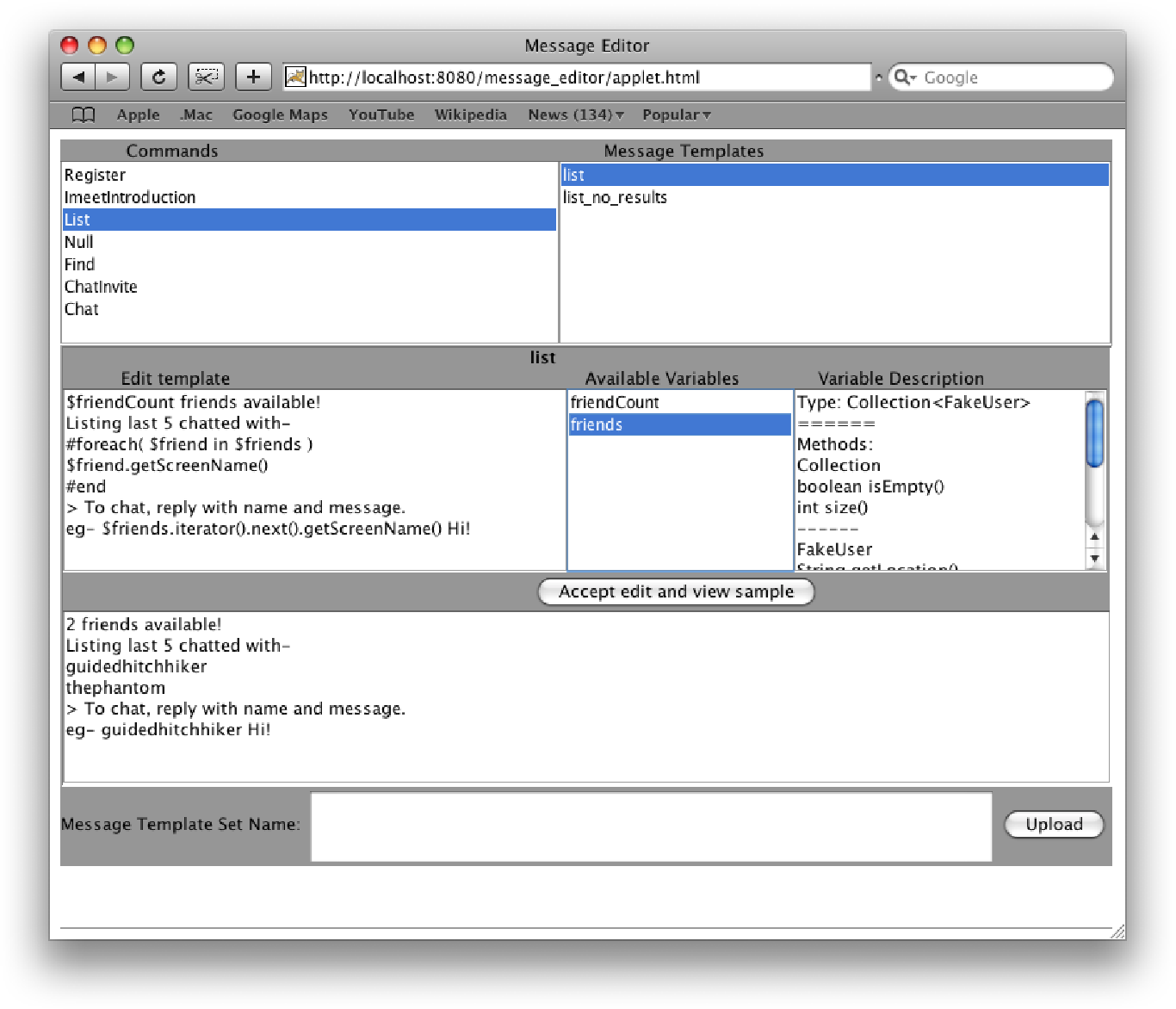
Overview Plus Detail [5] is a user interface pattern that will allow visualising the relationship between commands and the various templates that each command may forward to. See Figure 1.
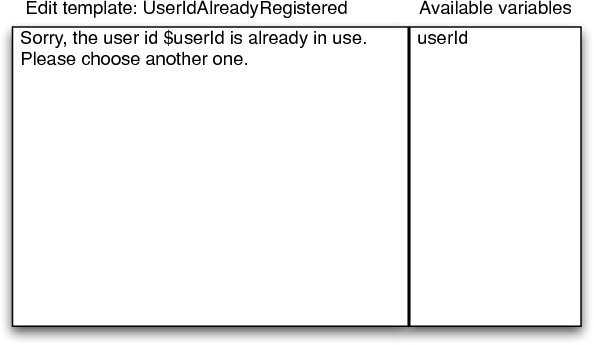
The editing area will present the selected template and show the variables available for use within that template. See Figure 2.
|
|
Once all templates have been customised, the customiser will upload them to the server.
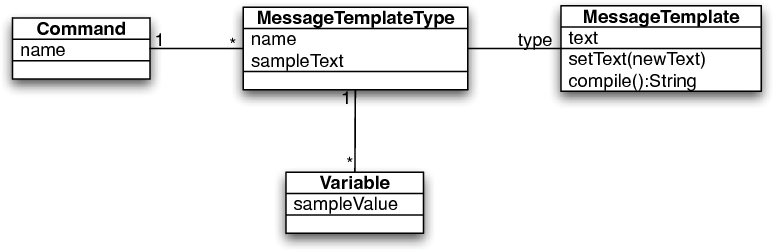
Each Command in the web application forwards to one of a number of Velocity templates, depending on the outcome of its execution. We will represent this in our editor with a Command class, whose instances are each associated with the MessageTemplates that are their possible outcomes.
A MessageTemplate has a default text that is to be customised, and a list of Variables that Velocity expects in its context. Variables have a sample value, which is an object that fakes the interface of the object used by the web application. The sample value is used for previewing the result of Velocity’s compiling the template.
We will split MessageTemplate into two classes, MessageTemplateType and MessageTemplate. A MessageTemplateType is the un-customised template used as a starting point for customisation. MessageTemplate represents a particular customisation. This is inspired by the Type Object pattern [6, 7]. See Figure 3.
Let’s see how we configure the system. First define some templates whose default values are chosen from Velocity macro files in the file system:
MessageTemplateType listTemplateType =
createMessageTemplateType("list"); listTemplateType.addVariable("friendCount", new Integer(2)); MessageTemplateType listNoResultsTemplateType = createMessageTemplateType("list_no_results"); MessageTemplateType createMessageTemplateType(String name) { return new MessageTemplateType( name, resourceContents( "/messagetemplates_copy/" + name + ".vm")); } |
In the web application the “List” command forwards to one of these two templates, so let’s represent this:
Command listCommand = new Command("List");
listCommand.addOutputPath(listTemplateType); listCommand.addOutputPath(listNoResultsTemplateType); |
We initialise the editor with a set of MessageTemplates created from the MessageTemplateTypes defined above. The preview of Velocity’s rendering a MessageTemplate is obtained using MessageTemplate.compile():
class MessageTemplate ...
private MessageTemplateType type; private String text; public String compile() { Writer writer = new StringWriter(); Velocity.evaluate( new VelocityContext(sampleVariableValues()), writer, "", text); return writer.toString(); } private Map sampleVariableValues() { return type.sampleVariableValues(); } class MessageTemplateType ... private Map variables; //name to Variable public Map sampleVariableValues() { Map values = new HashMap(); for (Iterator iterator = variables.keySet().iterator(); iterator.hasNext();) { String each = (String) iterator.next(); values.put(each, variableSample(each)); } return values; } public Object variableSample(String variableName) { return variableNamed(variableName).sampleValue(); } private Variable variableNamed(String variableName) { return (Variable)variables.get(variableName); } class Variable ... // fakes the interface of a domain object in the web app private final Object sampleValue; public Object sampleValue() { return sampleValue; } |
As it stands, the editor shows the list of variables available to a template. It would be even better if it could indicate variables’ interfaces. Template customisers aren’t programmers, so at most they will do simple things like invoking toUpperCase() on a variable of type java.lang.String. They can only do this if they know that the variable supports toUpperCase().
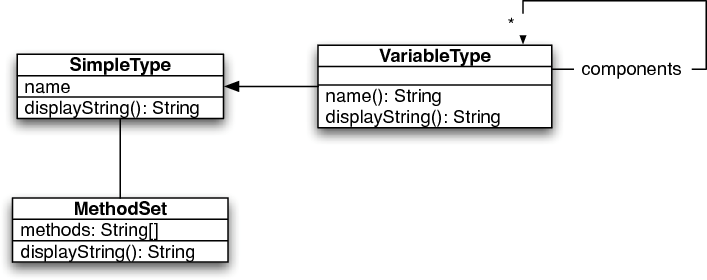
We need a new class VariableType that can document itself. Variables will know their VariableTypes. Some types are simple and they print the list of methods in their class. Other types are complex and are composed of other types, whose methods should also be printed. For instance, the type representing Collection of String needs to print the list of methods on Collection as well as the list of methods on String. There are even more complex types, such as Map of String to Set of User, which needs to document the interface of four classes. The Composite pattern [8] is a good fit. VariableTypes are composites with two responsibilities. They must:
String is represented by a VariableType containing a SimpleType with the MethodSet for String.class.
VariableType stringType = new VariableType(
"String", new String[] { "String trim()", "String toLowerCase()", "int length()", "boolean equalsIgnoreCase(...)", "String substring(...)"}); |
Collection<String> is represented by a VariableType containing a SimpleType for Collection and one component, which is a VariableType containing a SimpleType for String.
VariableType collectionOfStringType = new VariableType(
"Collection", new String[] { "boolean isEmpty()", "int size()"}); collectionOfStringType.addComponent(stringType); |
Here is how VariableTypes fulfil their two main responsibilities:
class VariableType ...
private final SimpleType simpleType; private List components; //VariableTypes public String name() { StringBuffer name = new StringBuffer(); name.append(simpleType.name()); if (!hasComponents()) return name.toString(); name.append("<"); name.append((component(0)).name()); for (int i = 1; i < components.size(); i++) { name.append(","); name.append(component(i).name()); } name.append(">"); return name.toString(); } private VariableType component(int i) { return ((VariableType)components.get(i)); } |
This gets a test like this working,
public void testMapOfStringToUserCollection() {
VariableType map = new VariableType( new SimpleType("Map")); map.addComponent(new VariableType( new SimpleType("String"))); VariableType collection = new VariableType( new SimpleType("Collection")); collection.addComponent(new VariableType( new SimpleType("User"))); map.addComponent(collection); assertEquals("Map<String,Collection<User>>", map.name()); } |
class VariableType ...
public Set simpleTypes() { HashSet results = new HashSet(); addSimpleTypes(results); return results; } private void addSimpleTypes(Set result) { result.add(simpleType); for (Iterator iterator = components.iterator(); iterator.hasNext();) { VariableType each = (VariableType) iterator.next(); each.addSimpleTypes(result); } } |
Then they can display themselves by printing the names and MethodSets of each component SimpleType. For example, we would like Collection<String> to display itself thus:
Type: Collection<String>
=================== Methods: Collection boolean isEmpty() int size() ------------------------- String String trim() String toLowerCase() int length() boolean equalsIgnoreCase(...) String substring(...) ------------------------- |
This is implemented as follows:
class VariableType ...
public String displayString() { StringBuffer displayString = new StringBuffer(); displayString.append("Type: " + name()); displayString.append(newline()); displayString.append("======"); displayString.append(newline()); displayString.append("Methods:"); displayString.append(newline()); //ask each SimpleType for its displayString() for (Iterator iterator = simpleTypes().iterator(); iterator.hasNext();) { SimpleType each = (SimpleType) iterator.next(); displayString.append(each.displayString()); displayString.append(newline()); displayString.append("------"); displayString.append(newline()); } return displayString.toString(); } class SimpleType ... private final String name; private final MethodSet methodSet; public String displayString() { StringBuffer displayString = new StringBuffer(); displayString.append(name); if (!methodSet.isEmpty()) { displayString.append( System.getProperty("line.separator")); displayString.append(methodSet.displayString()); } return displayString.toString(); } class MethodSet ... private final String[] methods; public String displayString() { return methodsSeparatedBy( System.getProperty("line.separator")); } private String methodsSeparatedBy(String separator) { if (isEmpty()) return ""; StringBuffer buffer = new StringBuffer(); buffer.append(methods[0]); for (int i = 1; i < methods.length; i++) { buffer.append(separator); buffer.append(methods[i]); } return buffer.toString(); } |
Now that we have our model in place, all that remains is to instantiate it.
class MessageEditorApplet ...
public void init() { super.init(); initializeVelocity(); initializeMessageTemplateSet(); validateMessageTemplateSet(); initializeWindow(); } private void initializeMessageTemplateSet() { MessageTemplateTypeRepository repository = new MessageTemplateTypeRepository(); DataLoader.load(repository); messageTemplateSet = new MessageTemplateSetFactory(repository) .create(); } class DataLoader ... static void load(MessageTemplateTypeRepository repository) { addListCommandOutput(repository); addChatInviteCommandOutput(repository); addChatCommandOutput(repository); addFindCommandOutput(repository); addImeetIntroductionCommandOutput(repository); addNullCommandOutput(repository); addRegisterCommandOutput(repository); } static void addListCommandOutput( MessageTemplateTypeRepository repository) { Command listCommand = new Command("List"); MessageTemplateType listTemplateType = createMessageTemplateType("list"); listTemplateType.addVariable( "friendCount", VariableTypeFactory.createIntegerType(), new Integer(2)); Collection friends = new HashSet(); friends.add(new FakeUser("thephantom", "a jungle")); friends.add(new FakeUser("guidedhitchhiker", "manali")); listTemplateType.addVariable( "friends", VariableTypeFactory.createCollectionType( FakeUser.class), friends); repository.add(listTemplateType); listCommand.addOutputPath(listTemplateType); MessageTemplateType listNoResultsTemplateType = createMessageTemplateType("list_no_results"); repository.add(listNoResultsTemplateType); listCommand.addOutputPath(listNoResultsTemplateType); } // methods to define templates for // the other commands are similar class MessageTemplateSetFactory ... MessageTemplateTypeRepository messageTemplateTypeRepository; MessageTemplateSet create() { Set messageTemplates = new HashSet(); for (Iterator iterator = messageTemplateTypeRepository .findAll().iterator(); iterator.hasNext();) { MessageTemplateType each = (MessageTemplateType) iterator.next(); MessageTemplate messageTemplate = each.createSampleTemplate(); messageTemplates.add(messageTemplate); } return new MessageTemplateSet(messageTemplates); } |
Figure 5 shows the editor’s final user interface.
This article described the object model of a tool to customise the views in our web application. We no longer have to rely on programmers for such customisation. Because the object model is separate from its configuration, it can even be used for our other web applications. All that will need to change is the configuration in DataLoader.
[1] <http://velocity.apache.org/>.
[2] Inderjeet Singh, Beth Stearns, Mark Johnson, and the Enterprise Team, Designing Enterprise Applications with the J2EE Platform, Second Edition. Addison-Wesley, 2002.
[3] Martin Fowler, Patterns of Enterprise Application Architecture. Addison-Wesley Professional, 2002.
[4] Eric Evans, Domain-Driven Design: Tackling Complexity in the Heart of Software. Addison-Wesley, 2003.
[5] Jenifer Tidwell, Designing Interfaces: Patterns for Effective Interaction Design. O’Reilly Media, Inc, 2005.
[6] Martin Fowler, Analysis Patterns: Reusable Object Models. Addison-Wesley Professional, 1996. Section 2.5, Accountability Knowledge Level.
[7] Joseph W. Yoder, and Ralph E. Johnson, “The Adaptive Object-Model Architectural Style”, WICSA 3: Proceedings of the IFIP 17th World Computer Congress - TC2 Stream / 3rd IEEE/IFIP Conference on Software Architecture. Kluwer, B.V., 2002. pp. 3–27.
[8] Erich Gamma, Richard Helm, Ralph Johnson, and John Vlissides, Design Patterns: Elements of Reusable Object-Oriented Software. Addison-Wesley, 1998.